
Affiliate Referral Center Tutorial
运营话术
2026-05-12 | 5m

App guide
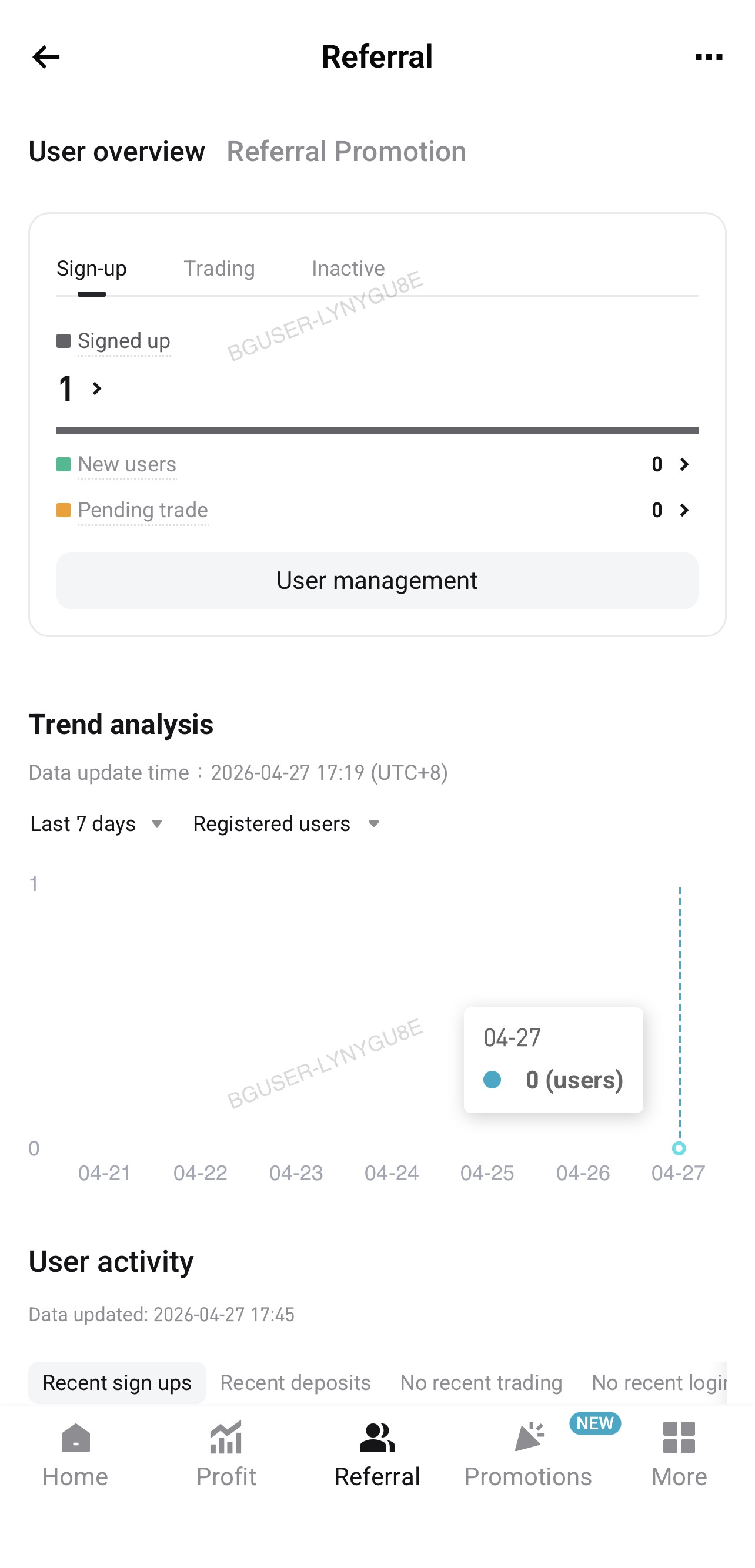
1. Referral Center: Nagbibigay sa affiliates ng mabilis na overview ng kanilang referrals, kabilang ang mahahalagang user status gaya ng signups, trading activity, at inactivity. Trend analysis helps you track referral growth and conversion performance.
 |
 |
a. User overview: Ipinapakita sa isang tingin ang signup, trading, at inactivity data ng iyong referrals, na tumutulong sa iyong maunawaan ang kanilang kasalukuyang activity levels at kabuuang user composition. You can switch between the following three views at the top of the page:
- Sign-up: Ipinapakita ang signup data para sa iyong referrals, na nagbibigay ng insights tungkol sa kasalukuyang status ng mga bagong referral at ng mga pending conversion.
- Signed up: Ang kabuuang bilang ng referrals na nakumpleto ang signup sa loob ng kasalukuyang data range.
- New signups: Mga referral na kamakailan lang nag-sign up ngunit hindi pa makabuluhang nakikipag-engage sa platform.
- Pending first trade: Mga referral na nagpakita ng ilang activity ngunit hindi pa nakakumpleto ng trade.
- Trading: Ipinapakita ang trading-related data para sa iyong referrals, na tumutulong sa iyong mabilis na matukoy ang converted users at mga user na may risk na mag-churn.
-
- Traded users: Ang kabuuang bilang ng referrals na nakumpleto ang hindi bababa sa isang trade.
- Actively trading: Mga referral na kasalukuyang active sa trading.
- Churn risk: Mga referral na hindi nag-trade kamakailan at maaaring may risk na mag-churn.
- Inactive: Ipinapakita ang data tungkol sa inactive users, na tumutulong sa iyong matukoy ang mga user na maaaring kailangang i-re-engage.
-
- Inactive users: The total number of referrals who are currently inactive.
- Dormant assets: Referrals whose accounts still hold assets but who have not traded for an extended period.
- Deep inactive: Referrals with no assets in their account who have not logged in for an extended period.
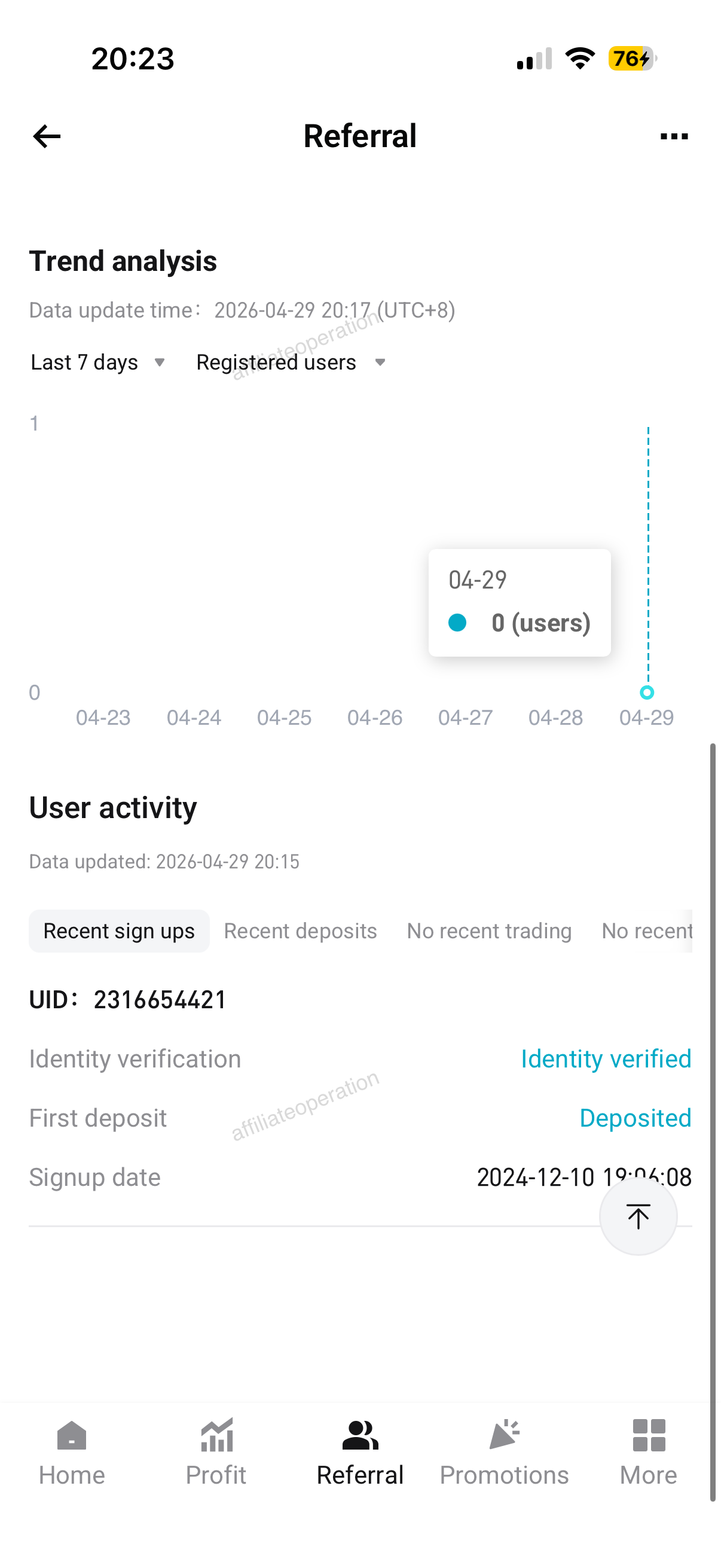
b.Trend analysis:
- Signed up: The number of daily sign-ups within a specified period.
- Identity verified users: The number of users who complete identity verification each day within a specified period.
- Number of depositing users: The number of users who make deposits each day within a specified period.
- Number of traders: The number of users who trade daily within a specified period.
c. User activity:
- Mga kamakailang pag-sign up: Sa lahat ng mga user na inimbitahan mo, ipinapakita ng seksyong ito ng mga user ID ng mga kamakailang pag-sign up, status ng pag-verify ng pagkakakilanlan (na-verify/hindi na-verify), status ng deposito (na-deposito/hindi na-deposito), at oras ng pag-sign up.
- Recent deposits: Among all your invited users who have completed identity verification, this section displays the user IDs of the users who have recently deposited, their deposit status (deposited/not deposited), the range of their most recent deposit amounts (0, (0–10], (10–50], (50–200], (200–1000], >1000), and recent deposit time.
- Walang kamakailang pangangalakal: Sa lahat ng iyong mga inimbitahang user na dati nang nakipagkalakalan ngunit naging hindii aktibo kamakailan, ipinapakita ng seksyong ito ang kanilang mga user ID, status ng asset (na may mga asset/walang mga asset), panahon ng kawalan ng aktibidad sa pangangalakal (hindi na-trade sa loob ng 15 araw/hindi na-trade sa loob ng 30 araw), at ang pinakahuling oras ng kalakalan.
- Walang kamakailang pag-log in: Sa lahat ng iyong mga inimbitahang user na hindi aktibo, ipinapakita ng seksyong ito ang kanilang mga user ID, tagal ng hindi aktibo (walang pag-log in sa loob ng 30 araw/walang login sa loob ng 60 araw), at angn kanilang pinakabagong oras sa pag-log in.
2. Referral Center > User management: direct referral
-
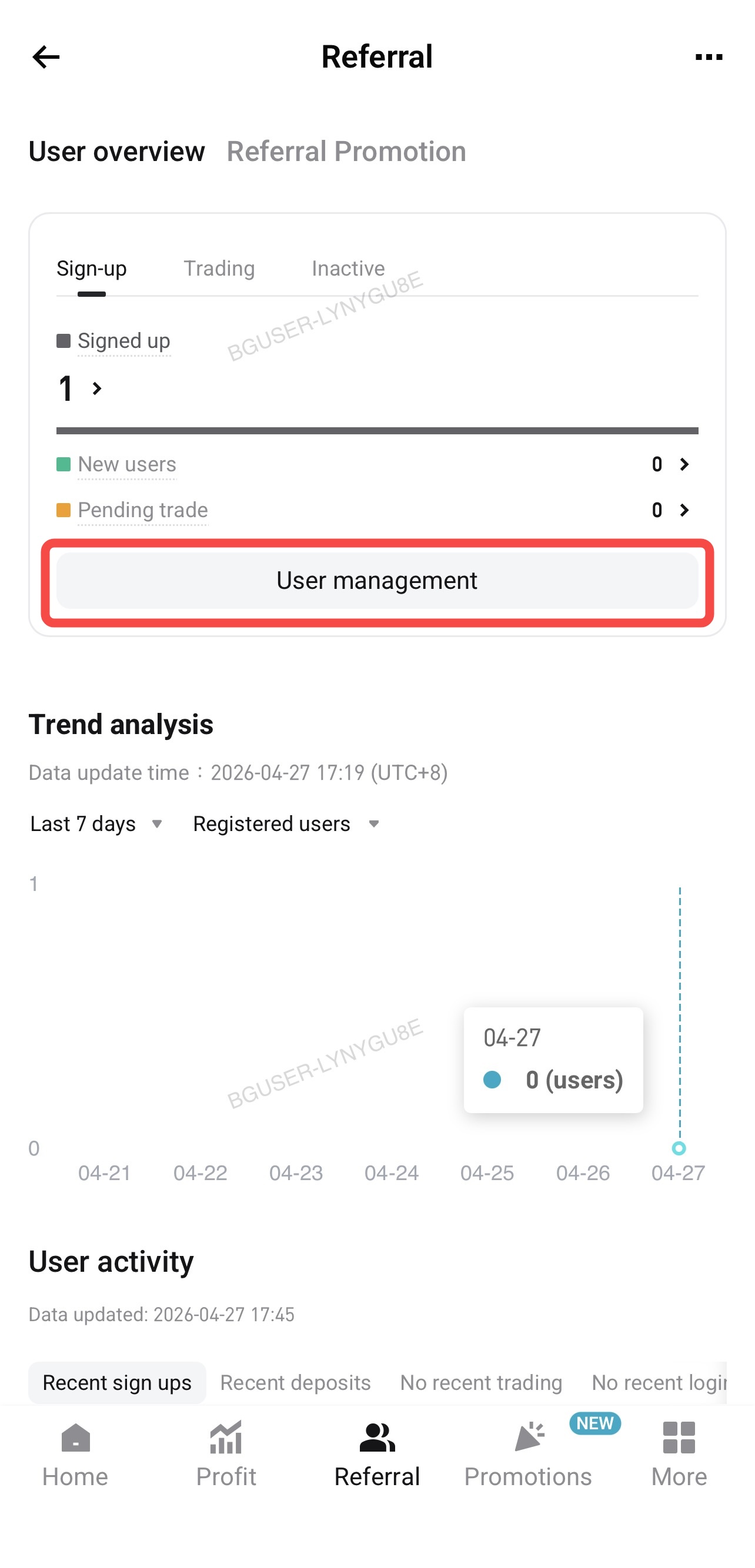
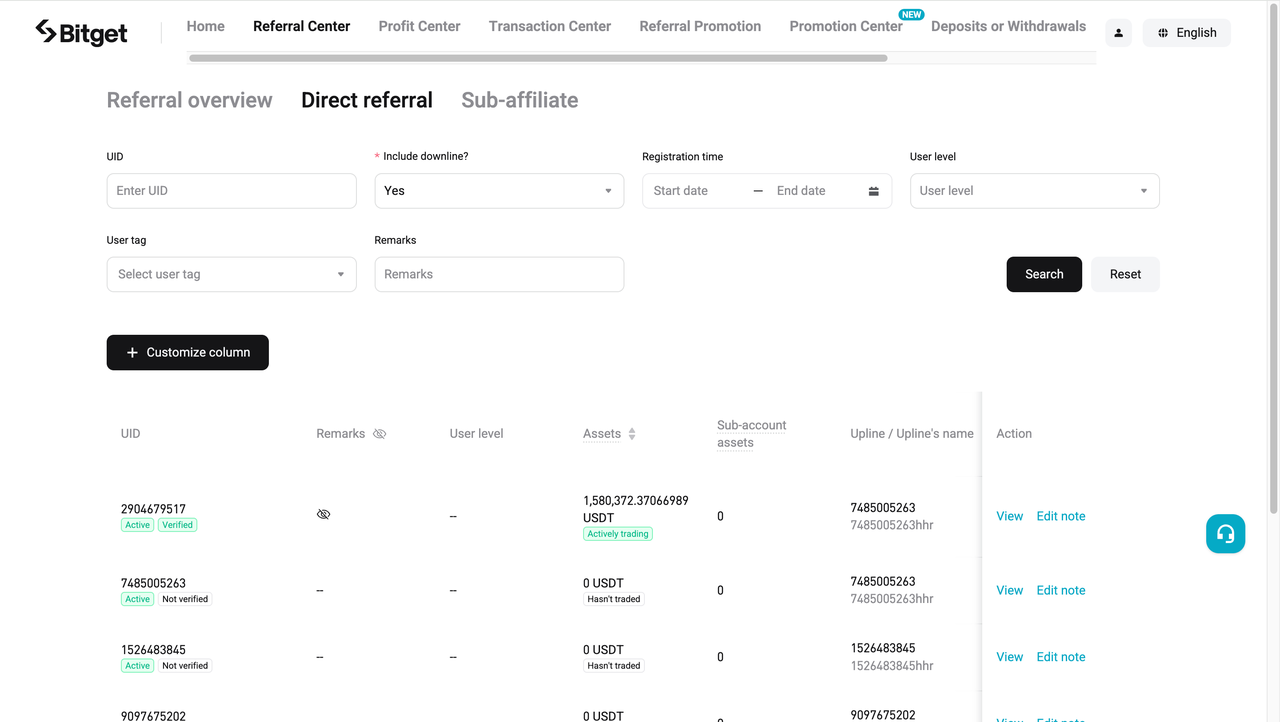
Access: Tap User Management to segment and filter users by signup time, tags, or sorting options.
 |
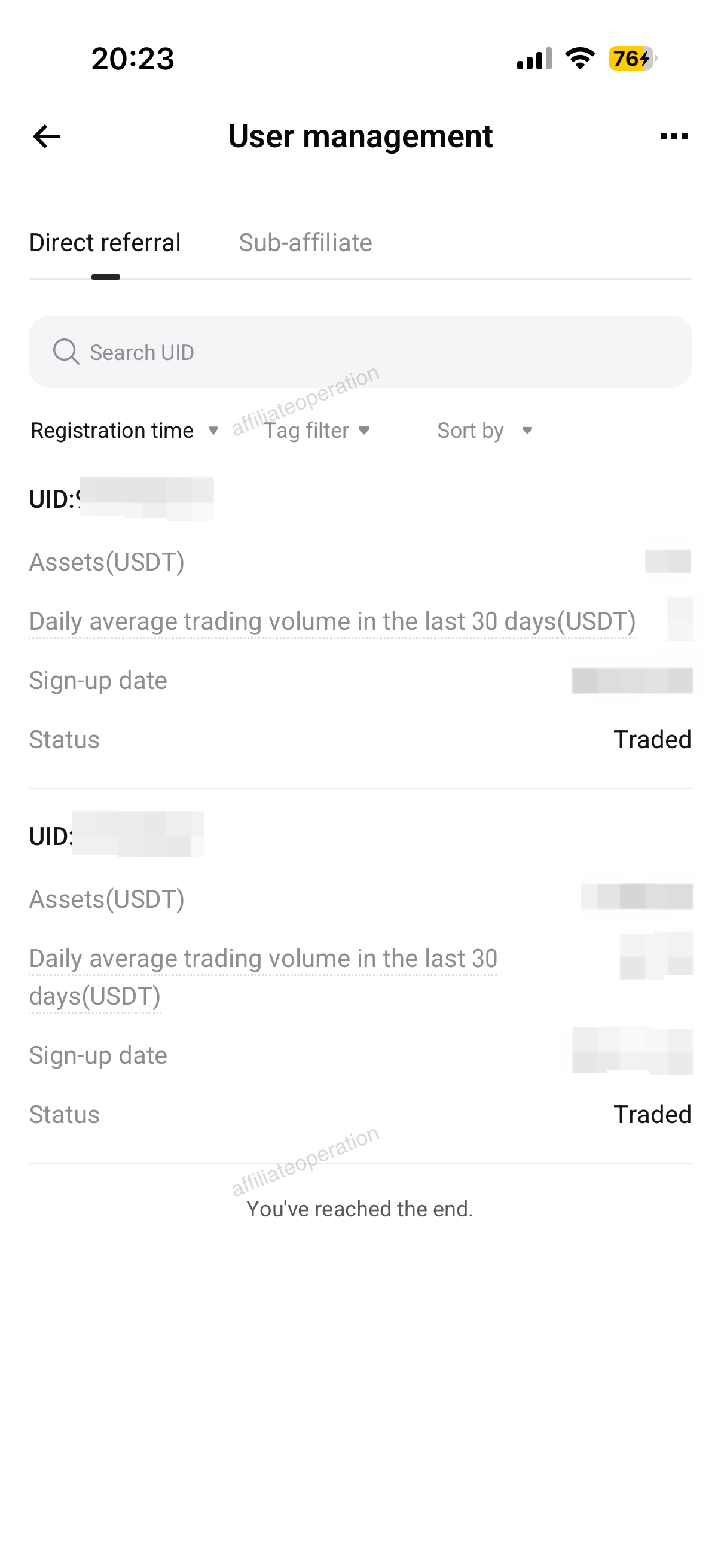 |
b. Search UID: Maaari mong ilagay ang user ID ng iyong inimbitahang user upang tumpak na i-query ang kanilang impormasyon.
c. Filtering feature:
- Maaari mong i-filter ang mga inimbitahang user ayon sa petsa ng kanilang pag-sign up. Maramihang mga time frame ay suportado.
- Mabilis na filter: Mabilis mong ma-filter ang mga user na nag-sign up sa loob ng huling 7, 30, 60, o 90 araw.
- Custom na hanay ng petsa: Maaari mong i-filter ang mga user na nag-sign up sa loob ng napiling panahon, hanggang sa nakalipas na 90 araw.
- Tag filtering: Use multiple tags to filter users. Conduct tiered management precisely and efficiently:
- Identity verification: Verified/not verified
- Asset types: With assets/without assets
- User level: None/VIP/PRO
- Activity status: Active/no login for 30 days/no login for 60 days
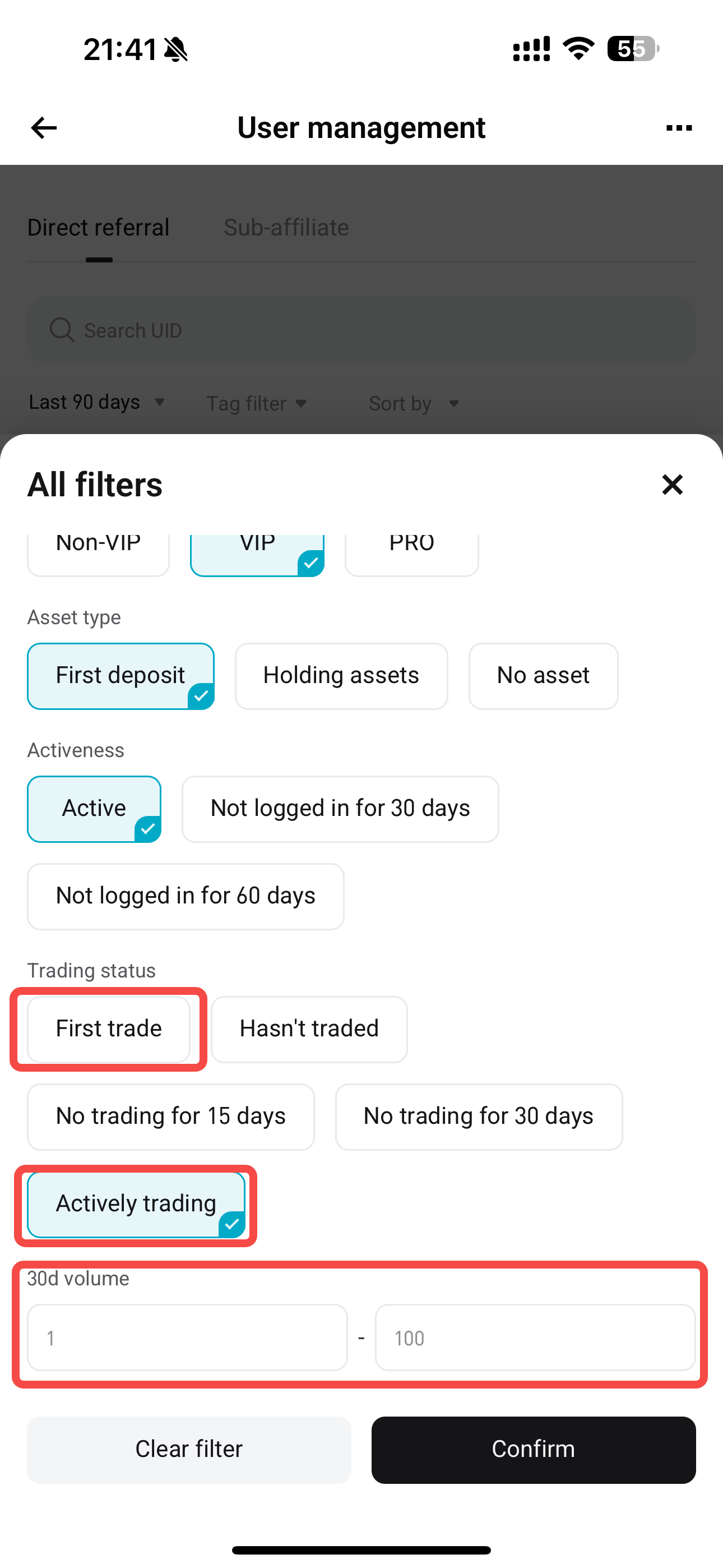
- Trading status: First trade/not traded/not traded for 15 days/not traded for 30 days/active trading. When you select the "First trade" or "Active trading" tags, a filter box for trading volume over the past 30 days will appear, allowing you to filter users based on their trading volume within the last 30 days.
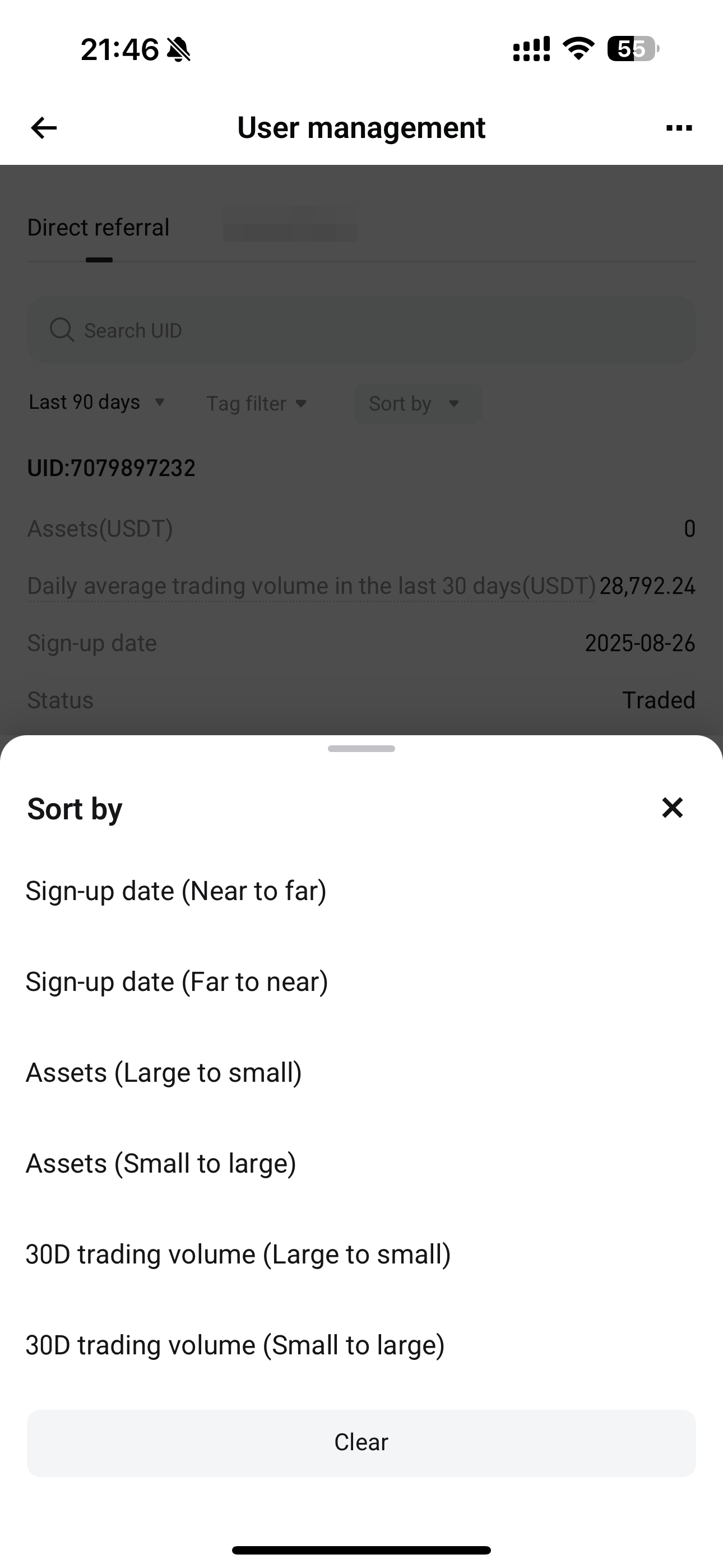
d. Sorting: You can sort users by their sign-up time, asset volume, and trading volume over the last 30 days.
 |
 |
Website guide
This guide explains how to use the Referral Center module in the Bitget Affiliate Portal. It helps you efficiently view data for your referrals and sub-affiliates, segment users, manage direct referrals and sub-affiliates, and follow up with key users.
1. Homepage
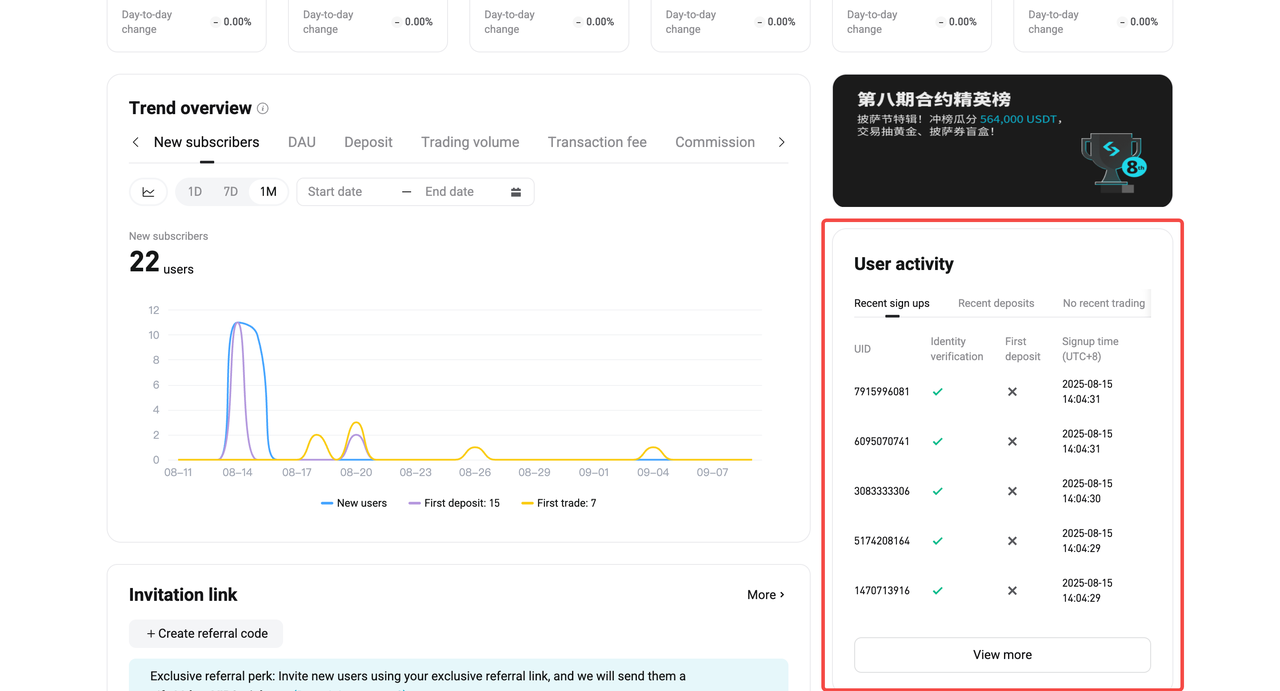
User Activity: A new
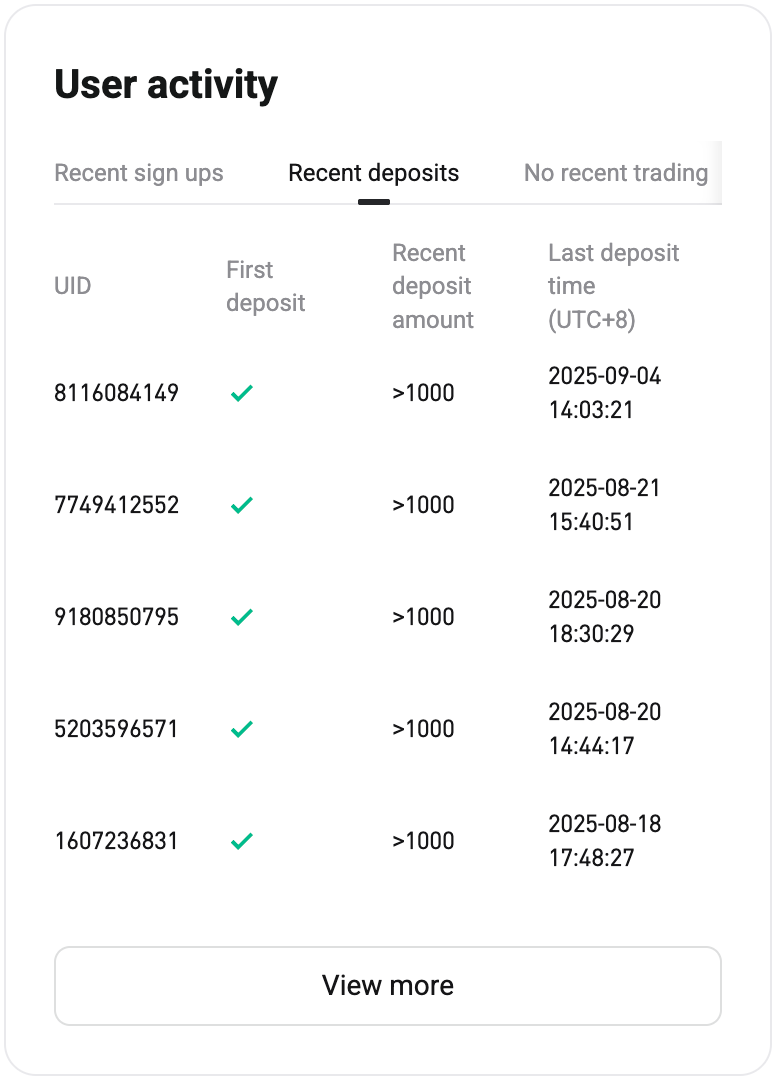
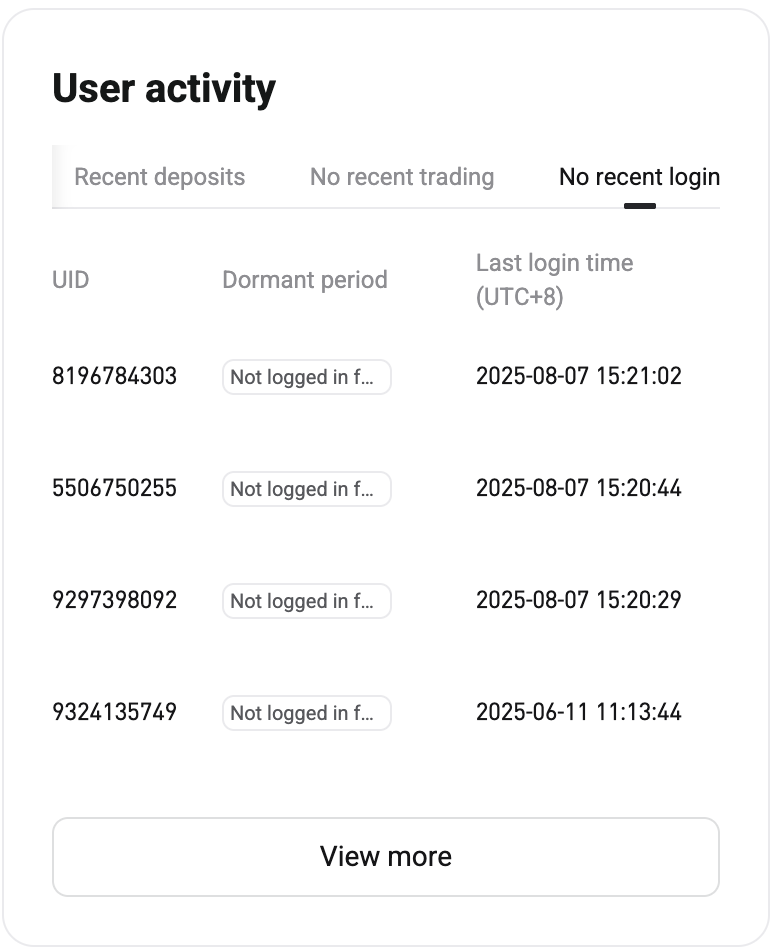
User Activity section has been added to the Affiliate Portal homepage. It displays activity from invited users across four leaderboards: "Recent sign ups", "Recent deposits", "No recent trading", and "No recent login". Each leaderboard shows up to five records. To view more, click
View All to go to the user activity leaderboard in the Referral center, where you can view up to 100 records.
Leaderboard descriptions:
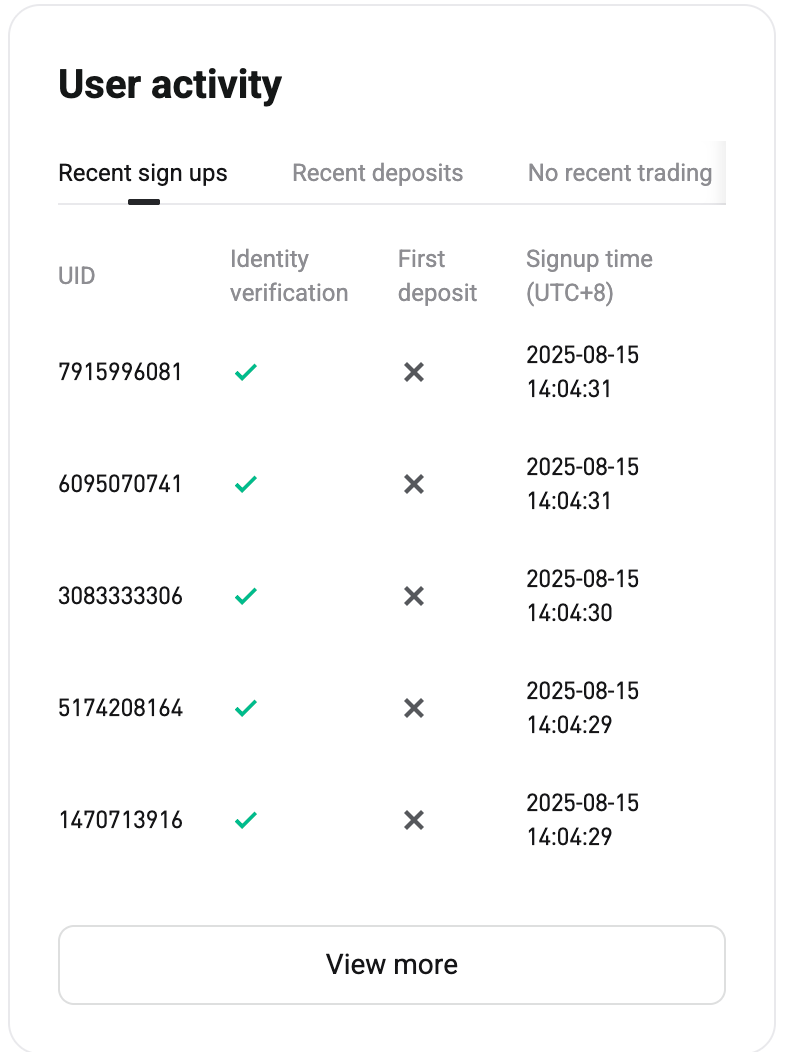
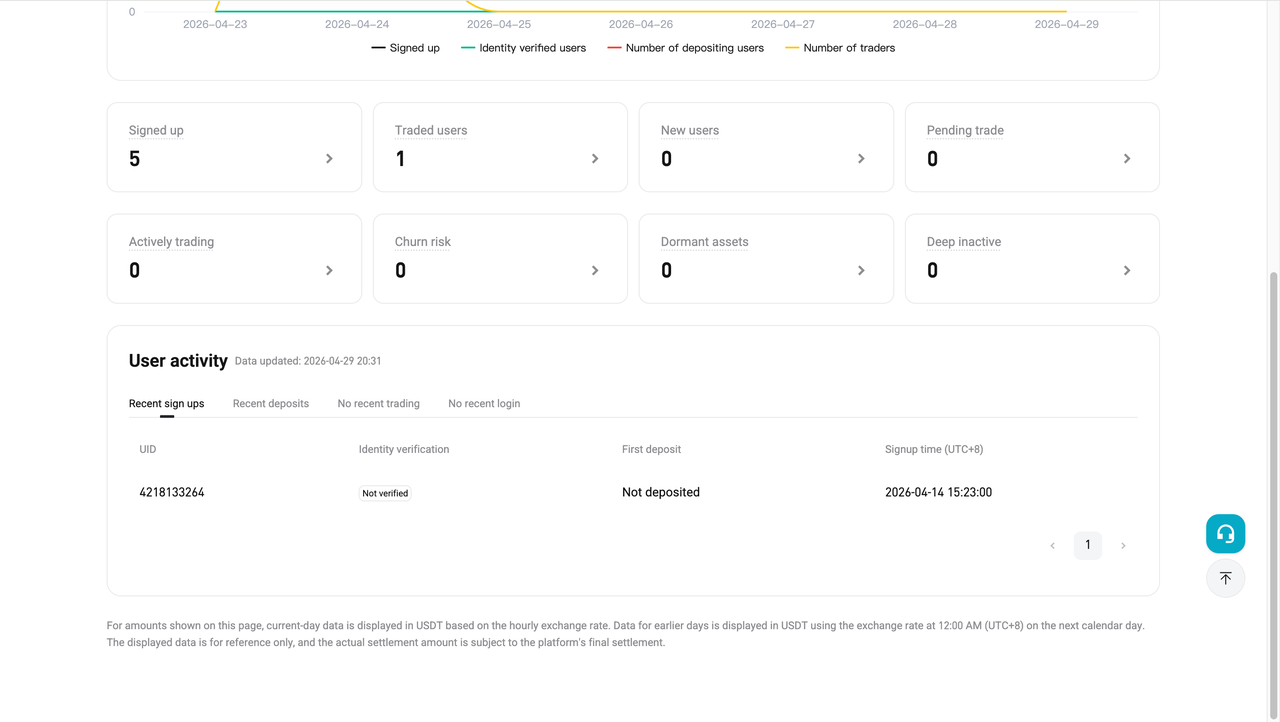
- Recent sign ups: Among all the users you have invited, this section displays the user IDs of the recent sign-ups, identity verification status (verified/unverified), deposit status (deposited/not deposited), and sign-up time.
- Recent deposits: Among all your invited users who have completed identity verification, this section displays the user IDs of the users who have recently deposited, their deposit status (deposited/not deposited), the range of their most recent deposit amounts (0, (0–10], (10–50], (50–200], (200–1000], >1000), and recent deposit time.
- No recent trading: Among all your invited users who have previously traded but have been inactive recently, this section displays their user IDs, asset status (with assets/without assets), trading inactivity period (not traded for 15 days/not traded for 30 days), and the most recent trading time.
- No recent login: Among all your invited users who are inactive, this section displays their user IDs, duration of inactivity (no login for 30 days/no login for 60 days), and their most recent login time.
 |
 |
|
 |
2. Referral Center
a. Access: Bitget Affiliate Portal > top navigation bar > Referral Center.
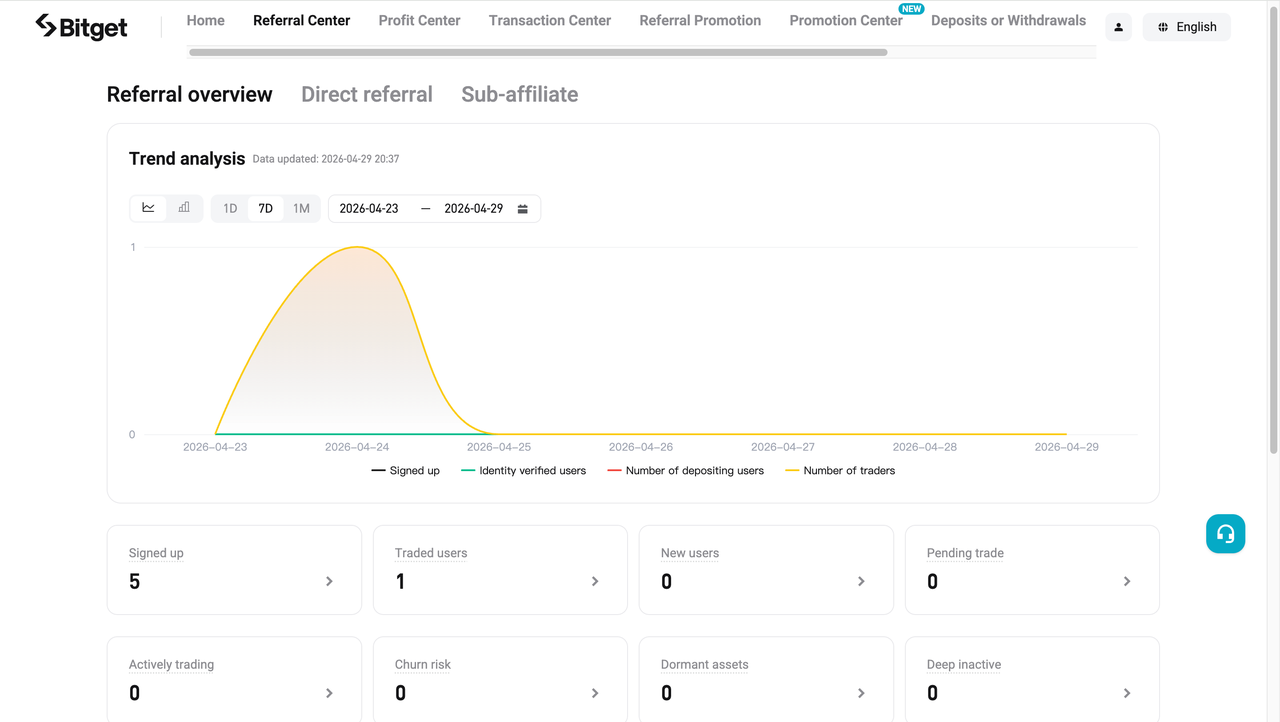
b. User overview: Provides a complete view of your users' signup, identity verification, deposit, trading, activity, and churn status. This is the core page for understanding where your referrals are in the user lifecycle.
-
Trend analysis:
-
Signed up: The number of daily sign-ups within a specified period.
-
Identity verified users: The number of users who complete identity verification each day within a specified period.
-
Number of depositing users: The number of users who make deposits each day within a specified period.
-
Number of traders: The number of users who trade daily within a specified period.
-
-
User classification:
-
Signed up: The total number of invited users who have completed signup within the current data range.
-
Traded users: Ang kabuuang bilang ng referrals na nakumpleto ang hindi bababa sa isang trade.
-
New users: Referrals who have recently signed up but have not yet meaningfully engaged with the platform.
-
Pending trade: Referrals who have completed identity verification, hold assets, and are active, but have not completed a trade.
-
Actively trading: Referrals who have completed identity verification, hold assets, are active, and trade frequently.
-
Churn risk: Referrals who have completed identity verification, hold assets, and are active, but have not traded in the past 15 days.
-
Dormant assets: Referrals who have completed identity verification, hold assets, and are active, but have not traded in the past 30 days.
-
Deep inactive: Referrals who have completed identity verification, hold no assets, and have not logged in in the past 30 days.
-
-
User activity: The leaderboard rules are consistent with those on the User Activity section. Each leaderboard shows up to 100 user records, and you can switch between the four leaderboards.
c. User details:
-
Select the Direct Referral tab to view all users you have directly invited. You can also filter users by user tag.
-
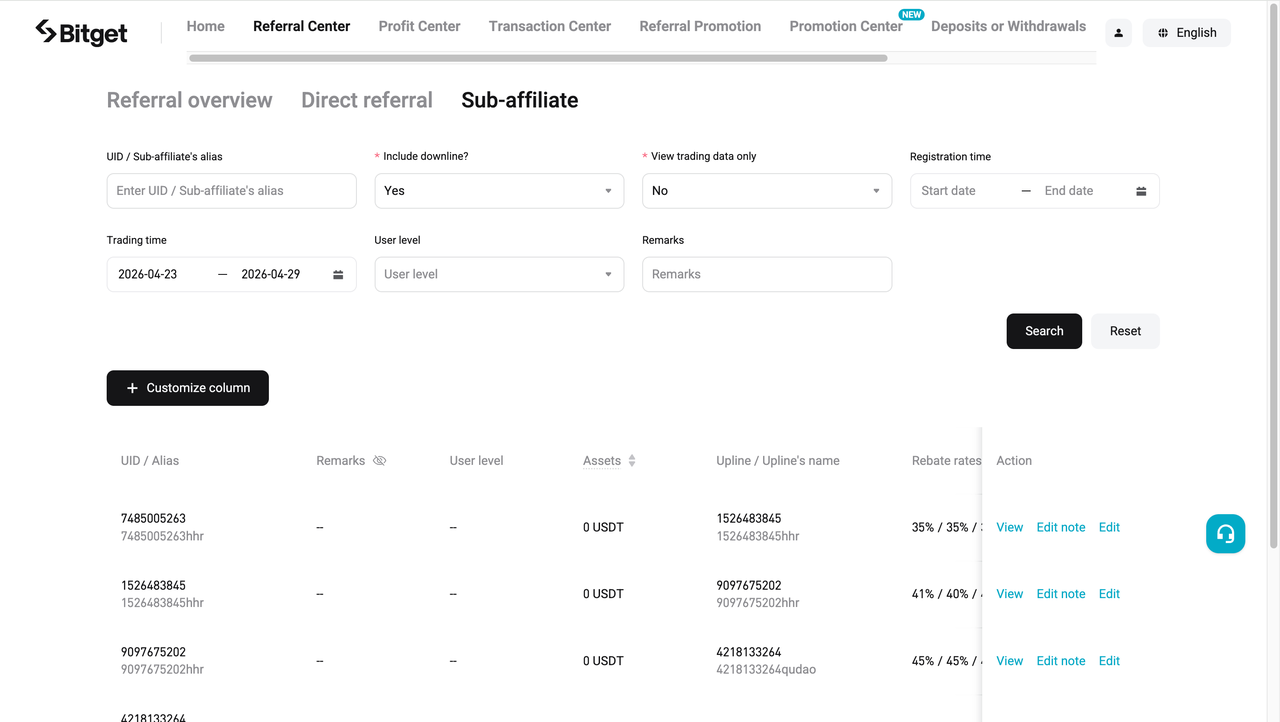
Select the Sub-affiliate tab to view all sub-affiliates you have invited.
Share


Content
- App guide
- Website guide
Paano magbenta ng PIInililista ng Bitget ang PI – Buy or sell ng PI nang mabilis sa Bitget!
Trade na ngayonIniaalok namin ang lahat ng iyong mga paboritong coin!
Buy, hold, at sell ng mga sikat na cryptocurrencies tulad ng BTC, ETH, SOL, DOGE, SHIB, PEPE, nagpapatuloy ang list. Mag-register at mag-trade para makatanggap ng 6200 USDT na bagong user gift package!
Trade na ngayon