
A step-by-step guide to tracking FOMO KOL addresses: learn it in 30 seconds, get it done in 5 minutes

Recently, more and more P members have started to use Fomo for a simple reason: it combines wallets, trading, and KOL updates in one place. Users can not only see who is making profits but also receive trade alerts from these leaders instantly.
Because Fomo uses a built-in wallet mode, the frontend does not directly display users’ wallet addresses. If you want to receive alerts, you have to use Fomo.
So here’s the question: Is there a way to receive Fomo KOL trade information without downloading the app? Yes, absolutely.
After practical testing, I’ve compiled the following strategy for automated address extraction and monitoring. Simply capture the leaderboard request once, let AI organize all four leaderboards, and then batch import into GMGN.
From now on, you won’t have to wait for KOLs to signal trades; you can find clues directly from wallet activity.
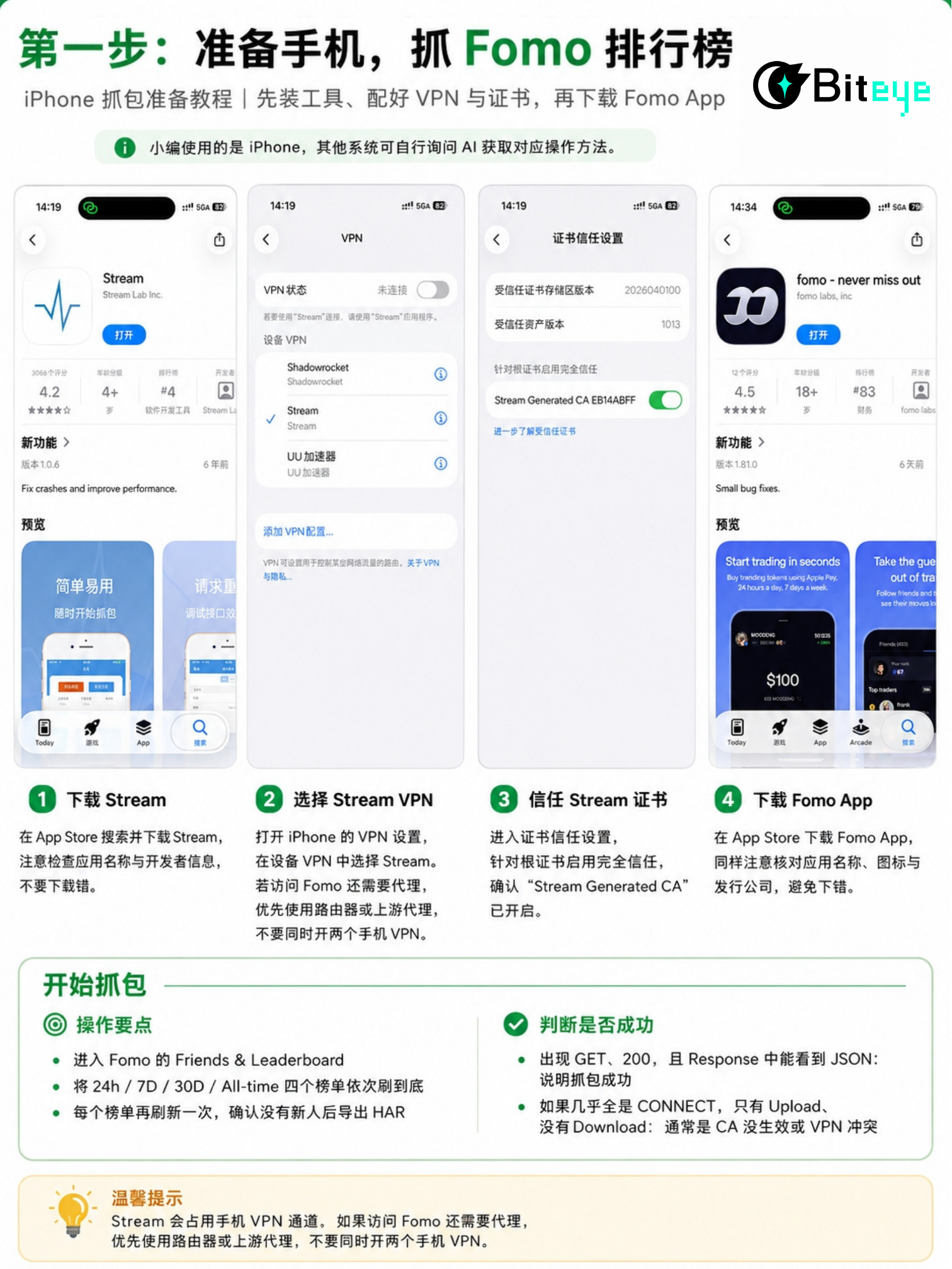
Step One: Prepare your phone and capture the Fomo leaderboard
I used an iPhone, but friends with other systems can ask AI how to proceed.
1. Download the fomo app from the App Store—be sure to check the description and publisher to avoid installing the wrong one!
A quick note: this app requires you to be 18 or older to download. You might need to take a photo of your credit card, ID, or passport for verification.
Based on my testing, using a regular Chinese ID card is enough to pass the verification.
2. Start packet capturing. Go to Fomo’s Friends & Leaderboard section and scroll through the `24h / 7D / 30D / All-time` boards completely one by one, refreshing each board once more to make sure all entries are up to date. Finally, export the HAR file.
It’s actually very easy to confirm if the packet capture is successful:
- If you see `GET` and `200`, and a JSON appears in the response: success;
- If it’s all `CONNECT` and you only see Uploads but no Downloads: either your CA didn’t work or there’s a VPN conflict.
Friendly reminder: Streams will occupy your phone’s VPN channel. If you need a proxy to access Fomo, it’s best to use a router or upstream proxy. Do not enable two VPNs on your phone at the same time.
Step Two: Prepare the HAR file and send it to an AI Agent for batch processing
The original HAR file may contain cookies, authorization info, and device IDs. Make sure to anonymize it locally before uploading—never upload sensitive data directly.
You can use the following prompt directly:
```text
Extract Fomo’s 24h, 7D, 30D, and All-time trader leaderboards from this de-identified HAR file;
Exclude clan, token, and perp; merge duplicate users and validate Solana/EVM addresses;
If any fields are missing, keep them as null—do not make guesses; output GMGN JSON by chain,
Each entry should only contain address, name, and emoji.
```
The GMGN format is as follows:
```json
[{"address":"wallet address","name":"fomo:nickname","emoji":"🔥"}]
```
Save separate files for Solana, Base, and BSC, and keep each file under 2,000 entries.
Step Three: Import into GMGN for real-time monitoring
Go to the bulk import in the top right and paste the JSON for each chain separately.
Note: fomo’s EVM addresses might be smart contract wallets. Ordinary EOA monitoring may not recover all of their internal transactions. It’s best to prioritize monitoring Solana addresses; for EVM addresses, use the new FOMO wallet tracking feature in GMGN to cross-reference with actual on-chain data.
Extra Tips: Which addresses are most worth tracking?
- On 24h only: they may have just caught a hot trend once—put these in the short-term group;
- On both 7D and 30D: they’re more consistent—focus monitoring here;
- Also on All-time: add to the long-term watchlist;
- Multiple independent addresses buying the same token in a short time: more useful than a single KOL buying in.
- Also filter out MEV, developer wallets, wash trading addresses, and wallets that buy in only after a big pump.
The greatest value of this method isn’t blind copy trading—it's that it compresses what would be dozens of minutes manually extracting addresses into a single packet capture. While others are waiting for KOLs to post on social media, you’re already watching wallet moves in real time.
Disclaimer: The content of this article solely reflects the author's opinion and does not represent the platform in any capacity. This article is not intended to serve as a reference for making investment decisions.
You may also like
Policy Advancements and Retreats Amid July Economic Data
Bitway (BTW) Continues to Steal the Show as Bitcoin (BTC) Holds Above $63K: Market Watch
Point72 AI Power Strategy Shifts: Reduces Holdings in Nvidia (NVDA.US) and Broadcom (AVGO.US), Initiates Position in Texas Instruments (TXN.US)
Point72 Asset Management has submitted its Q2 holdings report (13F) for the period ending June 30, 2026.

Japanese Yen: BoJ hike expectations support JPY against US Dollar – MUFG
Crypto prices
More


