Slippage Protection for Bitget Futures Market Orders: Slippage Tolerance and Slippage Warning
[Estimated reading time: 3 minutes]
Why is this feature needed?
Market orders are designed for fast execution. However, when order book depth is insufficient, the actual execution price may deviate significantly from the mark price. Because users cannot control this price deviation in advance, it may lead to significant losses. To address this issue, Bitget has introduced two optional features for futures market orders: Slippage Tolerance and Slippage Warning. You can enable either feature as needed, set your preferred tolerance threshold, and better manage execution price risk.
About the two features
Slippage tolerance
Once enabled and configured, the system sets a price limit for your market order based on the best bid and ask prices in the order book. In other words, the market order is converted into a Limit IOC (Immediate-or-Cancel) order. The order type shown in Order History and Transaction History will also be displayed as Limit.
• Any portion of the order that exceeds the price limit and cannot be filled within the specified range will be automatically canceled, preventing execution at a less favorable price.
Slippage warning
Once enabled, the system estimates slippage before you place each market order based on the current order book depth.
• If the estimated slippage for fully executing the order exceeds the threshold you set, a prompt will appear before the order is placed, asking whether you want to continue.
• This feature does not restrict or cancel your order. It only alerts you to the potential risk in advance.
The two features work independently. You can enable either one or both at the same time. Both features are disabled by default, so they won't affect your existing market order trading experience.
How to use them
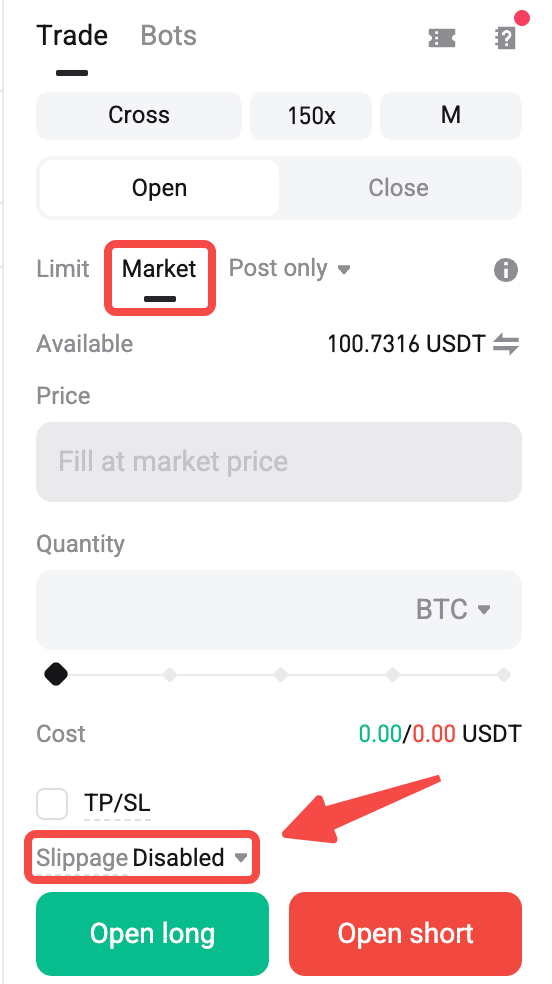
1. Select Market in the order placement panel. You will see a new Slippage option, which is displayed as Disabled by default.
2. Select the option to open the settings window. Here, you can enable or disable Slippage Tolerance and Slippage Warning separately, then drag the sliders to set the corresponding percentage.
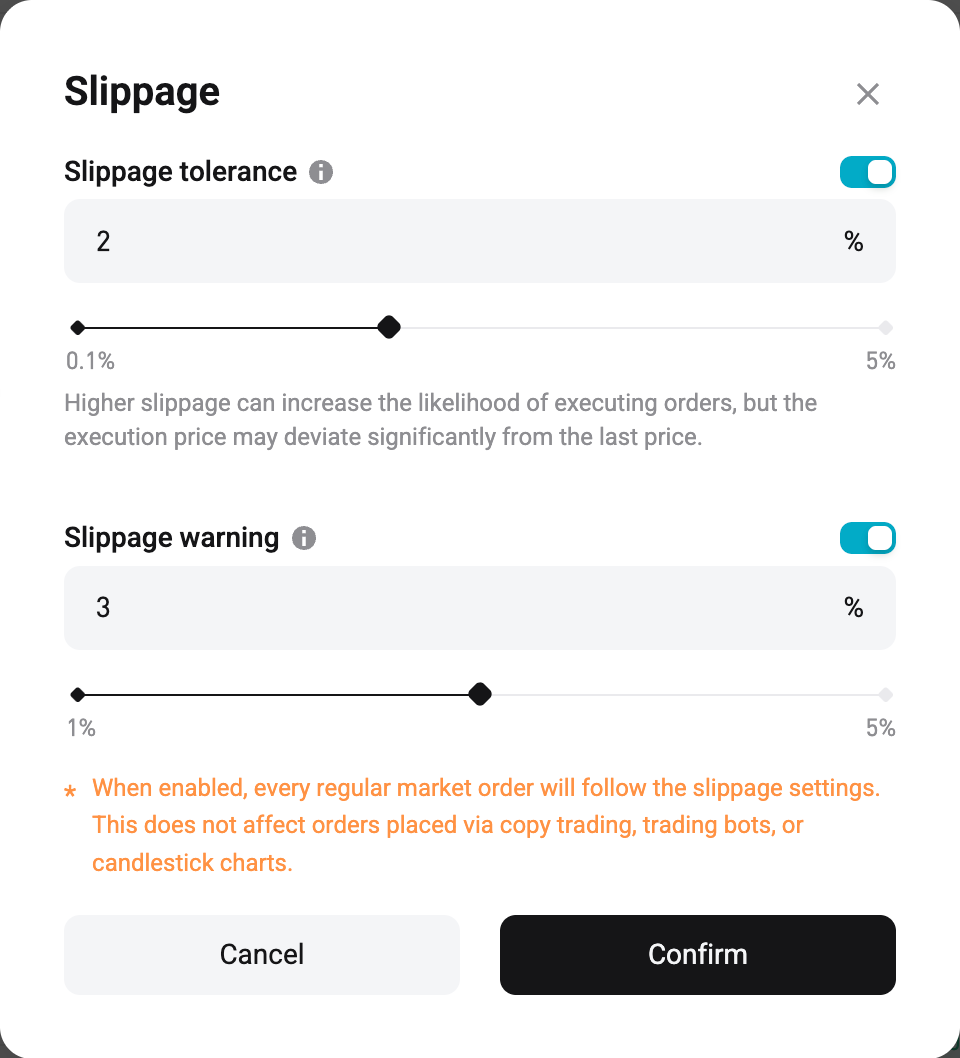
• For slippage tolerance, the minimum percentage is 1%, and the maximum percentage is the upper limit for the limit order price range minus 100%.
• For slippage warning, the minimum percentage is 0.1%, and the maximum percentage is the upper limit for the limit order price range minus 100%.
3. Select Confirm to apply the settings immediately.
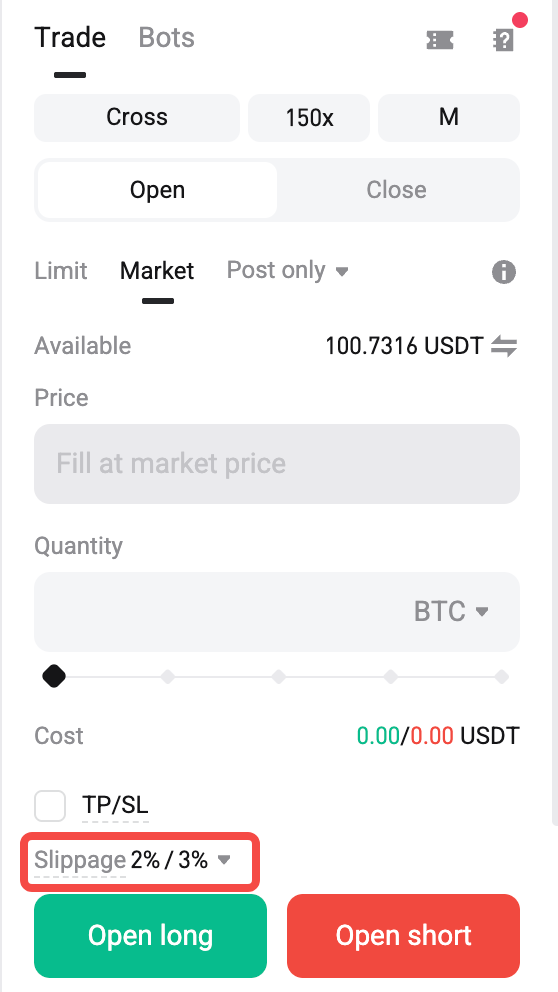
4. Select Open Long or Open Short to review the order details, and then select Confirm to place the order.
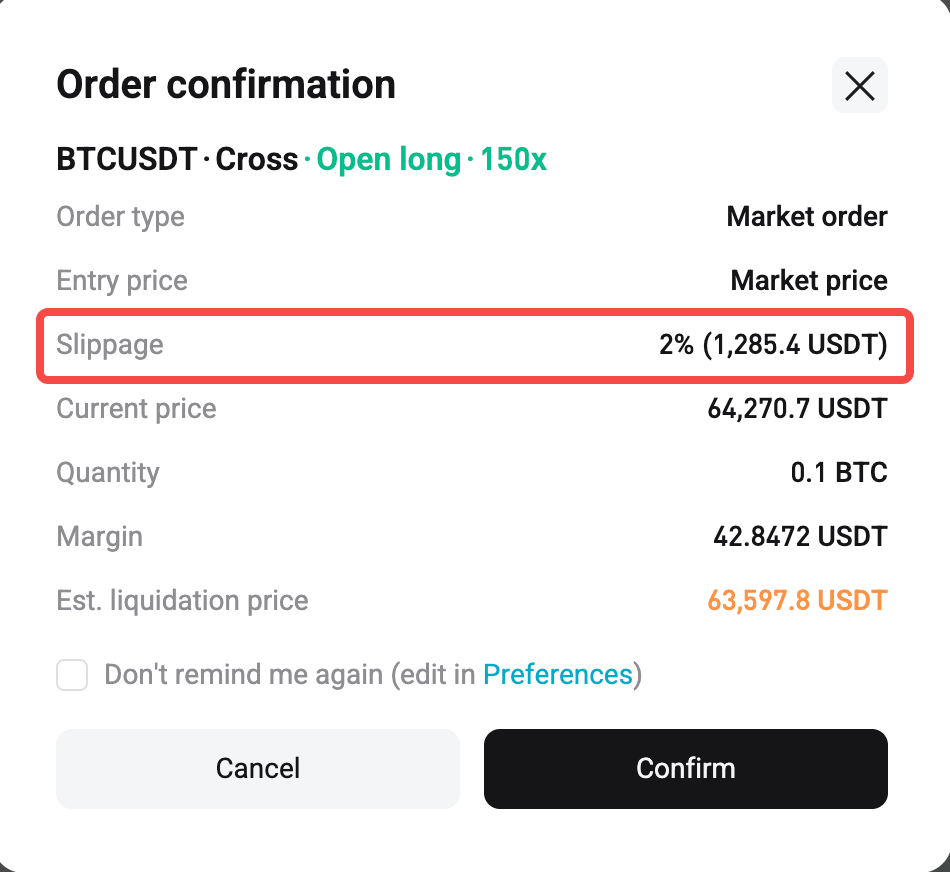
a. When slippage tolerance is enabled, the order confirmation window will include a new Slippage field showing the percentage you set and the corresponding price. The order will be submitted as a limit order with a specified validity period. If the order size exceeds the available order book depth, the order will be partially filled and the remaining portion will be canceled. The order source shown in the trade notification will also be displayed as Limit. The limit order price is calculated based on your settings.
• Buy order price = Ask1 × (1 + slippage percentage)
• Sell order price = Bid1 × (1 – slippage percentage)
b. When slippage warning is enabled, if the estimated execution slippage exceeds your configured threshold, you will receive a prompt before placing the order. For example, "Your market order to buy BTCUSDT with 100 USDT is expected to incur more than 3% slippage. Do you want to continue? You can configure or disable this warning under Slippage on the trading page." You can choose to continue placing the order or cancel it.
c. Note that in Order History, both the order type and execution type for this order will be displayed as IOC/Limit.
FAQs
1. Will my market order trading experience be affected if I do not enable either feature?
No. Both features are disabled by default. The order placement logic, confirmation process, trade notifications, and order history for market orders will remain exactly the same as before.
2. Will slippage tolerance cause my order to be partially filled?
Yes. If the order book depth is insufficient to fully execute your order within the configured slippage range, the portion exceeding that range will be canceled, while the filled portion will remain valid. This helps prevent execution at an unfavorable price.
3. Will slippage warnings prevent me from placing an order?
No. If the estimated slippage exceeds your configured threshold, the feature simply gives you an additional confirmation prompt. You can still choose to continue placing the order.
Join Bitget, the world's largest Universal Exchange (UEX)
Share